Accordion - center middle the text in the rows - center accordion

Good for very long questions that run to 2 or more lines.
Add the CSS to the page as it stops the title in the panel element from centering.

/*force the title into the middle of the row. */
accordion
.el-title {
display: flex;
align-items: center;
}

.el-title {
margin:0 auto;
}

  • Hits: 11

add button padding and remove text line height

/*added padding to buttons having lessened the line height for longer button content*/
.btn-info, .btn-primary, .btn-success, .uk-button-primary {
line-height: 1.6;
padding-bottom: 10px;
padding-left: 60px;
padding-right: 60px;
padding-top: 10px;
}

  • Hits: 10

Make main menu and mobile bold on hover rollover and active

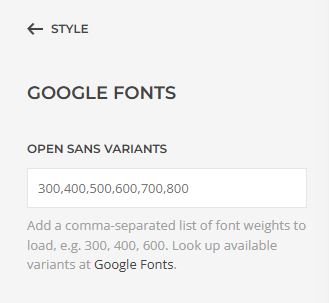
Make sure the Google Font sizes have been loaded into Style / Google Fonts Variants

load google font variants

/* 1. Main menu - active menu item bold without jumping*/
.uk-navbar-nav > li.uk-active>a {
font-weight: 700;
letter-spacing: 0.4px;
}
/* 2. Main menu - hover menu item bold without jumping*/
.uk-navbar-nav > li:hover > a {
font-weight: 700;
letter-spacing: 0.4px;
}
/* 3. Main menu Drop down sub menu - active menu item bold without jumping*/
.uk-navbar-dropdown-nav>li.uk-active>a {
font-weight: 700;
letter-spacing: 0.4px;
}
/* 4. Main menu Drop down sub menu - hover menu item bold without jumping*/
.uk-navbar-dropdown-nav> li:hover > a {
font-weight: 700;
letter-spacing: 0.7px;
}

/* 5. Mobile menu - active menu item bold without jumping*/
.uk-nav-default> li.uk-active>a {
font-weight: 700;
letter-spacing: 0.4px;
}
/* 6. Mobile menu - hover menu item bold without jumping*/
.uk-nav-default> li:hover > a {
font-weight: 700;
letter-spacing: 0.4px;
}
/* 7. Mobile Drop Down Sub menu - active menu item bold without jumping*/
.uk-nav-default .uk-nav-sub li.uk-active>a {
font-weight: 700;
letter-spacing: 0.4px;
}
/* 8. Mobile Drop Down Sub menu - hover menu item bold without jumping*/
.uk-nav-default .uk-nav-sub li:hover > a {
font-weight: 700;
letter-spacing: 0.4px;
}

  • Hits: 16

CSS for changing background and text colors in a grid

.uk-grid-item-match>:not([class*=uk-width]), .uk-grid-match>*>:not([class*=uk-width]) {
background-color: #001446;

    
.uk-panel>:last-child {
color: #fff;
    }
   
h3.el-title  {
       color: #fff}

p {
color: #fff}


  • Hits: 9