Screaming Frog - Redirects

Original document - Shared with everyon / Shared tutorials / Screaming frog / Crawl site to do bulk redirects tutorial

Choose –

Delimited / Next

Comma / Next

General / Finish

Keep Column A with the URLs in it, delete the rest

Delete any rows that aren't URLS

In column B add a line - | (the top figure next to the left hand shift key on the keyboard) all the way to the bottom of the URLs

Then save your document with a new name e.g. internal_all-updated


Open Notepad, Show all files

Then click ‘File’ / ‘Open’ / and select your excel document from the list.

‘Edit’ / ‘Replace’

In the ‘Find what’ box type a comma and leave the ‘Replace with’ box blank. Then click ‘Replace all’ and exit the text box

Save

Go to the back of Joomla Manage / Redirects

copy and paste the whole thing into the Bulk import option then click Bulk Import


  • Hits: 2

Upgrading to Joomla 6.0.x

  1. Upgrade to J5.4.1 first, upgrade all extensions - take a backup
  2. Make sure PHP is at least 8.3
  3. Turn on debug mode and set error reporting to maximum - the next step can cause the site to be disabled - turning on reporting to maximum means you can see the offending pugin at the top of the error stack.
  4. System > Plugins - Disable the 'Behaviour - Backward Compatibility' Plugin - if you get a 'jPlugin erorr or any other kind of error it means there is an old plugin in the system whihc is still using the 'backeard compatibiilty' polugin that you have turned off.  Make a note of the offending plugin.
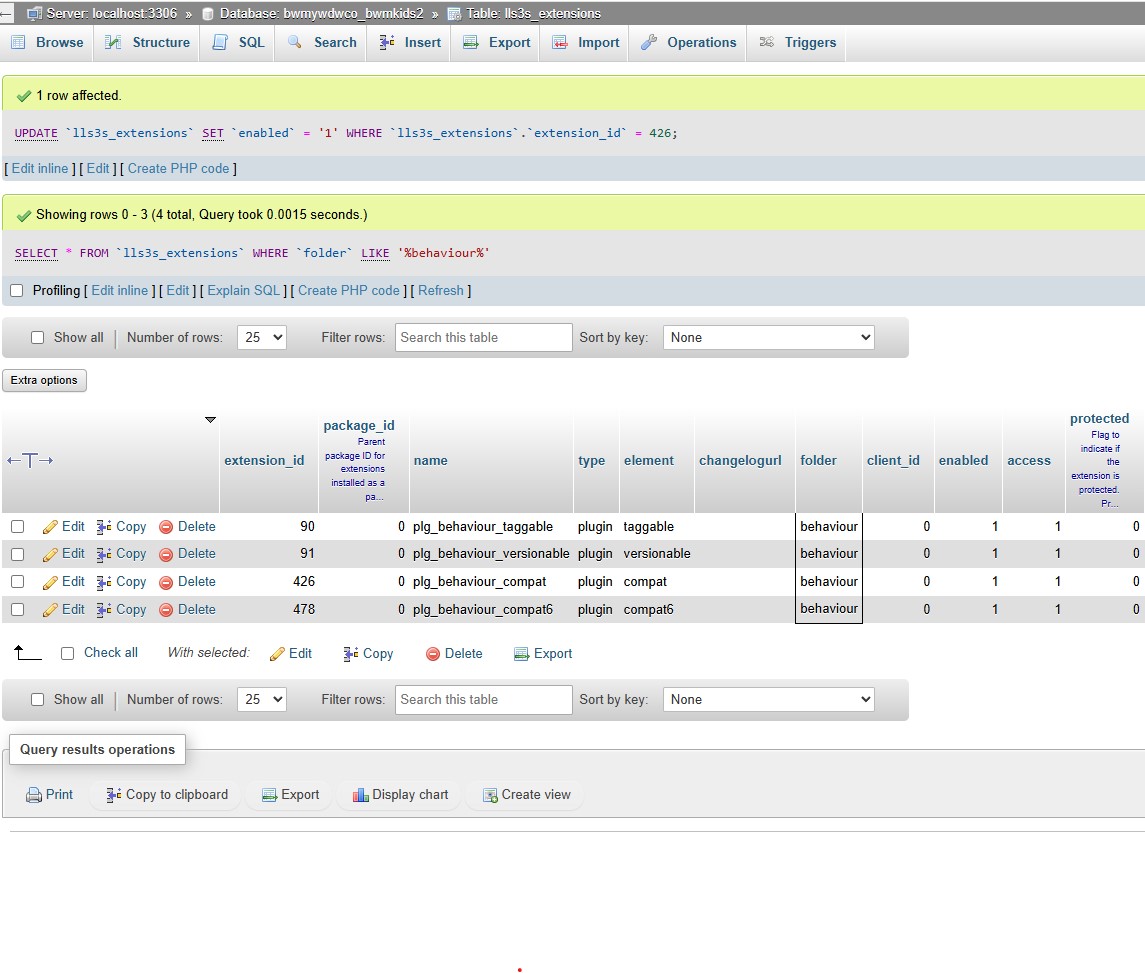
  5. To turn the backward compatibility plugin back on go to phpMyAdmin > ***_extensions table > search for 'plg_behaviour_compat' > re-enable the plugin

backward comp

Update, remove, uninstall the offending plugin and go round to point 4 again - Likely suspects are old Stackideas plugins (historical easyblog), Tassos framework - if engage box has been removed, and docman - they have a 'doclink' plugin that uses the backward compatibility plugin - you can disable it - it adds a 'doclink' button to the article editor, which we don't use anymore.

When you can turn off the plugin successfully go to the next step

6.  System > Update > Joomla > Options > Update Channel - Choose Joomla Next > Save& Close

7. ignore warnings regards Tassos Frameowrk as long as Engage Box is v 7.1.0 - if you get a warning about Akeeba backup - make sure the latest version is loaded  - at least 10.2.0

8. Hit the upgrade button - will go through Akeeba Backup service first

  • Hits: 7

Using the ACL to control access to Components

There are occasions where you want to restrict access to the administrator components - for instance of you need to give access to the submissions form a RS Form Pro Form.

1.  Add a new user group

Users > Groups > New 

Give it a name (marketing for example)  and make the Group Parent 'Manager', Save and Close.

2.  Create a new User and assign them to the new group

3.  Grant access to the component you wish them to use and deny to all others

System > Global Configuration - then set access as desired.  I found I had to turn off the following, which were all automatically allowed:

Media
Banners
News feeds
Smart Search
Templates


  • Hits: 8

Remove Home Menu Item

In Joomla you must have a default Menu, this can be a menu in any of your Menu Types ( eg: Main Menu , Footer Menu etc .. .) , this default menu does not have to link to your Home Page, so just delete the Home Menu and make sure you already have another Menu Item somewhere set as default.

  • Hits: 5