Upgrading to Joomla 6.0.x
- Upgrade to J5.4.1 first, upgrade all extensions - take a backup
- Make sure PHP is at least 8.3
- Turn on debug mode and set error reporting to maximum - the next step can cause the site to be disabled - turning on reporting to maximum means you can see the offending pugin at the top of the error stack.
- System > Plugins - Disable the 'Behaviour - Backward Compatibility' Plugin - if you get a 'jPlugin erorr or any other kind of error it means there is an old plugin in the system whihc is still using the 'backeard compatibiilty' polugin that you have turned off. Make a note of the offending plugin.
- To turn the backward compatibility plugin back on go to phpMyAdmin > ***_extensions table > search for 'plg_behaviour_compat' > re-enable the plugin
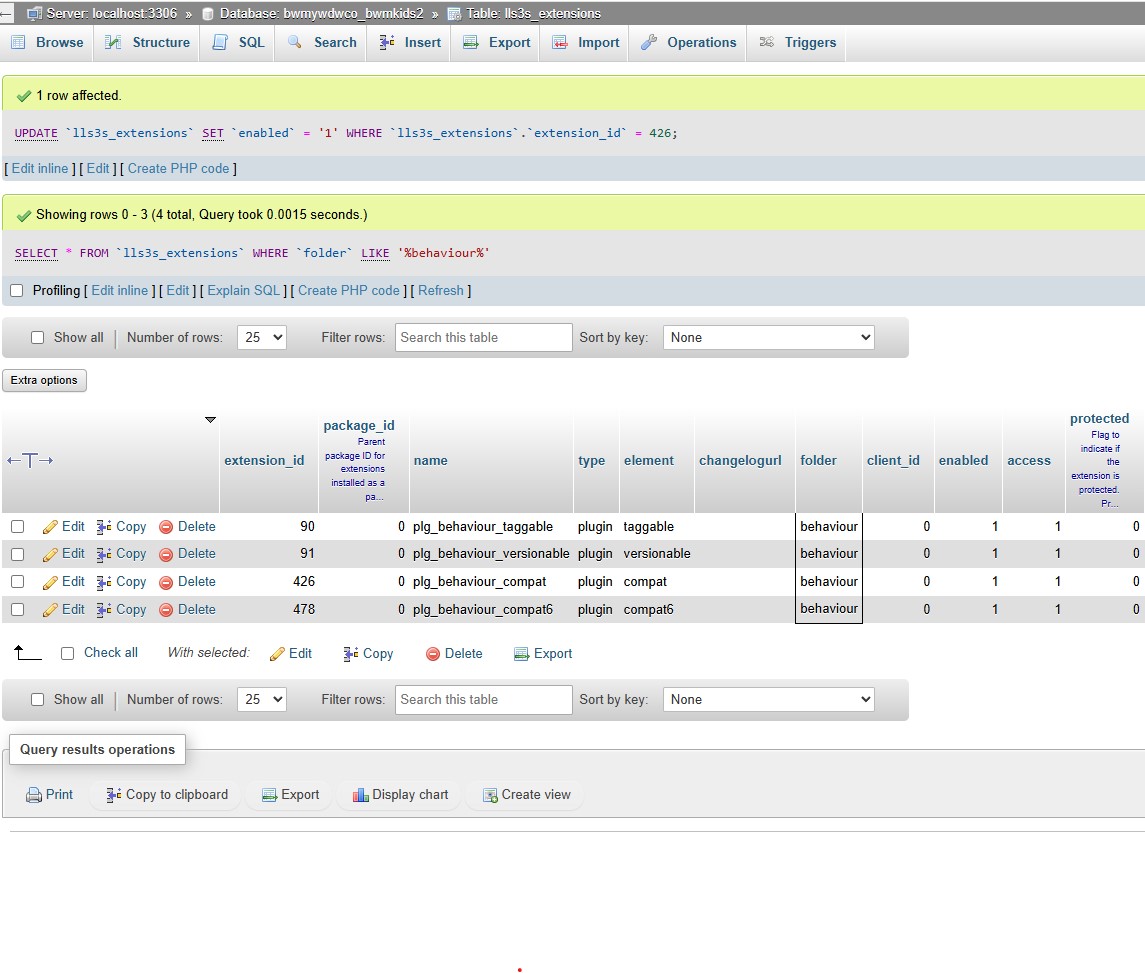
Update, remove, uninstall the offending plugin and go round to point 4 again - Likely suspects are old Stackideas plugins (historical easyblog), Tassos framework - if engage box has been removed, and docman - they have a 'doclink' plugin that uses the backward compatibility plugin - you can disable it - it adds a 'doclink' button to the article editor, which we don't use anymore.
When you can turn off the plugin successfully go to the next step
6. System > Update > Joomla > Options > Update Channel - Choose Joomla Next > Save& Close
7. ignore warnings regards Tassos Frameowrk as long as Engage Box is v 7.1.0 - if you get a warning about Akeeba backup - make sure the latest version is loaded - at least 10.2.0
8. Hit the upgrade button - will go through Akeeba Backup service first
- Hits: 14