Change colour of a single page background
Alternatively, assign a page class to this particular "Home" menu item which can be addressed via CSS:
In the Joomla backend go to Menus > Main Menu and edit your menu item "R1-Connect" (I am not sure how precisely it is spelled).
Into Page Display > Page Class enter the exact string
r1-connect 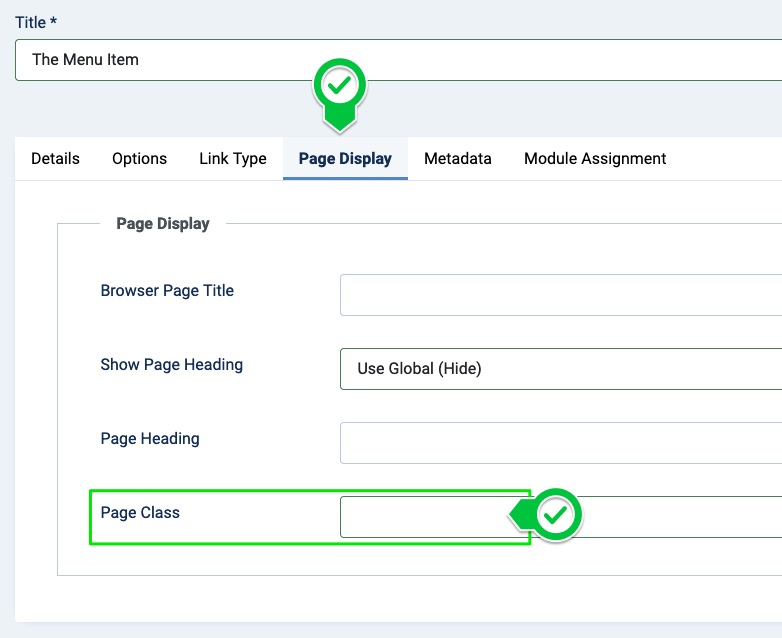
Click "Save & Close" in the toolbar.
Navigate to YOOtheme > SETTINGS > Custom Code and into the field "CSS/LESS" insert the following CSS:
 .r1-connect .uk-section {
  background-color: #00ff00;
  }
Same here: Adjust the colour, of course.
Save the changes, clear the cache, reload the page, and test the result.
Troubleshooting

How can I change the background color of a single article (using the builder)?
A Builder layout consists of sections, so one possible approach would be to apply the background to the sections. If the colour you want is not the "Default", "Muted", "Primary", or "Secondary" colour, you can employ the sections' Advanced > CSS fields insert something like
.el-section {
background-color: #00ff00;
}
for example.
How do I change the background color for an entire menu item/page?
It is not entirely clear what you mean. A menu item is usually a short linked text. If you want to individually apply a colour to it that is different from the other menu item, that also requires custom CSS.
And lastly, what’s the recommended method to set a default background color for the whole site/template?
What to do and whether or not it is even possible would very much depend on the layout and the setup. There is no link to the website and a page this is about, and the request is too general and lacks context to suggest anything spot-on. 😊
Getting a certain background colour behind the whole of the content would usually require customizations, though. With a YOOtheme > LAYOUT > Site > Layout: Full Width layout the page background would rarely be relevant because everything is about the "Sections", the "Columns", the elements, and their content and settings.
With a Layout: Boxed setup you can set the background colour at the left and right via YOOtheme > STYLE > General > Theme > Page Container > Background. To avoid misunderstandings: This background would usually not be visible in a "Full Width" layout.
Also, I have been using different layouts from the Library for various pages, and now I want to unify the overall style because there are inconsistent background colors across the site.
There is no possible answer to that because there are no technical details and no context. 😊
In the current version, I don’t see the background color options where they used to be (in the Style tab of a section). I want to make sure I'm not missing something.
Each section has a Section  > Settings > Style option where you can select a preset like "Default", "Primary", "Secondary", etc. The colours can be globally defined via YOOtheme > STYLE > General > Global > Backgrounds. Bear in mind that a change to these colours will affect all uses of the "Primary", "Secondary", etc. preset.
There has never been a "background color option" setting of a "Style" tab for the sections, though. 😊
- Hits: 22