Creating SSH Keys
I had to do this recently for accessing the new server for kinedo.co.uk
- open command prompt (cmd)
- enter
ssh-keygenand press enter - press enter to all settings. now your key is saved in the location specified on your local machine
The whole cmd screen for me looks like this
C:\Users\mike>ssh-keygen
Generating public/private ed25519 key pair.
Enter file in which to save the key (C:\Users\mike/.ssh/id_ed25519):
Created directory 'C:\\Users\\mike/.ssh'.
Enter passphrase (empty for no passphrase):
Enter same passphrase again:
Your identification has been saved in C:\Users\mike/.ssh/id_ed25519
Your public key has been saved in C:\Users\mike/.ssh/id_ed25519.pub
The key fingerprint is:
SHA256:fYFTlz+BHdO7TnqNKpUST6n2O2DmTHBp/9UvWBHfTjQ mike@DESKTOP-UOMG8LF
The key's randomart image is:
+--[ED25519 256]--+
|            . ++o|
|           o ooE+|
|          o... ==|
|        ..=.o..o=|
|        S+.*.. ++|
|          O.= .o+|
|         B = ++oo|
|          + +.+oo|
|           .o+.. |
+----[SHA256]-----+

C:\Users\mike>
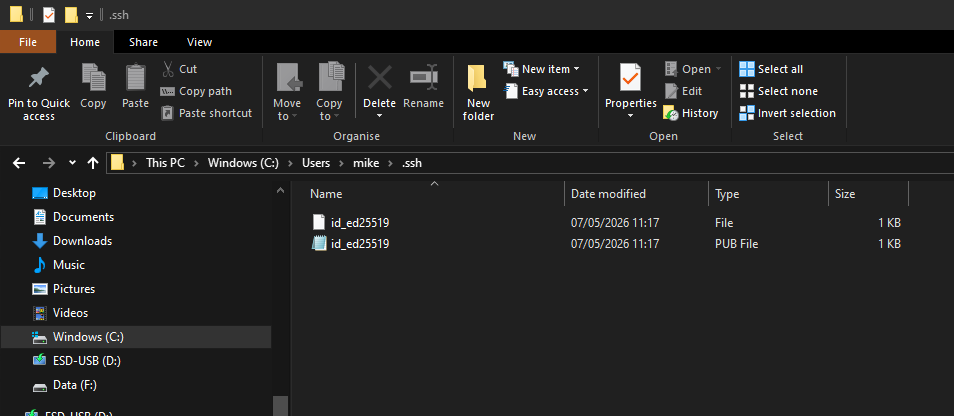
Within the folder there is now a 'PUB File' which you can share with others to authenticate your machine.
- Hits: 9